Online Transfer Files from one PC to Another with DirecTransFile


Generally when you want to share files from one PC to another, you upload it to a file sharing service and then provide the URL. It is a good method for sharing files online but I always avoid this because I think its time-consuming process for send lots of files. But you can use DirecTransFile (DTF) software allows you to transfer files or directories through internet directly from user to user. It is completely freeware portable tool so you can use it directly without and installation and lets you share files from one PC to another without having to upload the file. The downloading is controlled using a download code which is shared to the user who wants to download the file.
transfer-files-online-1
How to use it ?
Double click on downloaded software file and select files you want to share online, you can also add multiple files at single time and then click on register the application will generate a code to download files. Now send this generated code to other user who wants to download files.
transfer-files-online-2
Process on another computer:
Download and start same software on another computer and select Downloads.. option from taskbar icon of running application.
transfer-files-online-3
Now clock on Download button on application and enter previous generated code by application and select next.
transfer-files-online-4
After click on next it will ask for location enter you location and it will start downloading.
Features of DirecTransFile:
  • Secure – information about files list is not saved to server;
  • Immediate – you don’t need to upload files to files storage;
  • Fast – the data is transferred from user to user throughout direct connection;
  • Anonymously – user not needs to disclose private information. The  e-mail, name, country etc are not collected.
  • Traversable – in case both users  can’t create direct connection (they are both behind NAT) they can send/receive files through server.

Read more...

Remove BIOS Password using FREE utility – PCCMOS Cleaner


Do not have access to change the settings in BIOS?  Forgotten BIOS password?  or bought a laptop from someone, but seller did not tell you the BIOS password? There are many other scenarios where you need to enter BIOS settings and you find out that it’s been locked because of password protection.

If you forget login password of windows you can create a reset disk to restore password in case you forget it but for BIOS password there is no reset disk to restore. However you can remove or reset BIOS password physically – by opening the system’s case and removing the CMOS battery or changing jumper settings. But most of the beginners even amateurs hesitate to do experiments with the system’s hardware. For those users there is PC CMOS Cleaner which help to reset BIOS password in few clicks.
PC CMOS Cleaner is free and an easy-to-use tool to recover, delete, decode and display the superior passwords stored in BIOS whatever the brand is. Most types of BIOS are supported. It’s an bootable CD that runs on x86 and x86_64 computers. No need to pay expensive fees to experts because this utility is absolutely FREE to use.
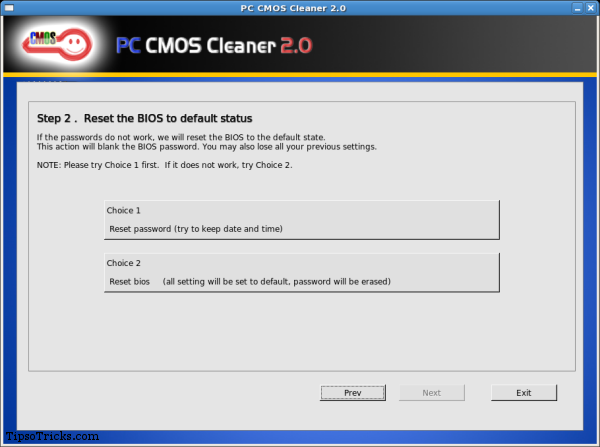
PC CMOS Cleaner screenshot
PC CMOS Cleaner Features:
* Support all x86, x86_64 Personal Computers.


* Support most BIOS, such as: AWARD, AMI, Compaq, Phoenix, Samsung, IBM, Compaq, DTK, Thinkpad, Sony, Toshiba and so on.


* Display the  superior passwords of the BIOS .


* Remove BIOS password (will set the BIOS to default status, need reset date).


* Set the BIOS to default state

How to reset BIOS Password?


2. Burn the ISO file to CD


3. Set the BIOS to boot from CD.


4. Insert the CD you burned and reboot your computer. The software then automatically runs.


5. Use PC CMOS Cleaner to finish the job.

It is recommended to see complete user-guide of PC CMOS Cleaner
Visit PCCMOS.com to read more and get the download link

Read more...

Trick to hack administrator Account using Guest account in XP- 100% works

Follow these steps:

1. ok, First of all login through your guest account and open C:\WINDOWS\system32

2. Now look for cmd.exe and sethc.exe

3. copy these both exe files and place it any safe location

4. Now again go to C:\WINDOWS\system32, now rename cmd.exe into sethc.exe...... As sethc.exe is already exist, so a window will open... says..would you want to replace..... press yes...


5. Now Restart your system.

6. When login screen come.... press Shift key for 5 times.... then command prompt will open.

7. Now you can hack an administrator account in 2 way:
  • By hacking recent administrator's account by changing its password.
  • By giving Administrator's privileges to your guest account 
      So decide what you want to do....

8. Now

      8.1    if  you choose 1st one i.e. "Hacking recent administrator's account by changing its password".>>> then go to my post Hack administrator account and follow step 3 & 4 there.

      8.2     Or if you choose 2nd one then write in command prompt:
                   net localgroup administrators your_guest_account_name /add


9. Done!!!!! :)

Read more...
Related Posts Plugin for WordPress, Blogger...

Engineering material

GTU IDP/ UDP PROJECT

GTU IDP/ UDP PROJECT

Patel free software download

  © Blogger templates The Professional Template by Ourblogtemplates.com 2008

Back to TOP